For ADX Asia, we built a workflow that brings the purchase order, invoice, reviews, payment record, and follow-up into one place. AI helps people find information and take the next step.
Assist. Verify. Analyze. Guide. These four pillars support work across ADX Flow, including payment requests and expense claims.
01 / Prepare the work
Assist
Help people prepare information and fill in routine details. They check and correct the suggestions before using them.
Example: in an expense claim, AI reads a receipt to help fill in the amount, date, and vendor, and suggests an expense category.
02 / Check the details
Verify
Help reviewers spot possible mismatches and duplicate claims. Findings show what needs a closer look; people decide what is correct.
Example: for a reimbursement, AI compares receipt details with the claim and flags possible issues for a person to review.
03 / Understand what needs attention
Analyze
Turn company records into answers people can use. Answers draw on the records and reports that person is allowed to access.
Example: ask “Which payments are still waiting?” or “What documents are outstanding?” to understand where follow-up is needed.
04 / Know what to do next
Guide
Explain how to do the work using the organisation’s own guidance. People can ask in everyday language and check the source.
Example: ask “How do I submit a payment request?” and get relevant instructions with a link to the guidance.
AI suggests and highlights. People check the information, confirm actions, approve requests, and remain responsible for payments.
The task
A vendor needs to be paid. What happens next?
Someone must prepare the request. Others need to check the amount and supporting documents, then decide whether to approve it. Finance needs the right details to record payment. Any unfinished documentation still needs an owner.
We connected these steps in the payment request module of ADX Flow. This is one example of a workflow: people, information, decisions, and actions working together from start to finish.
Inside the system
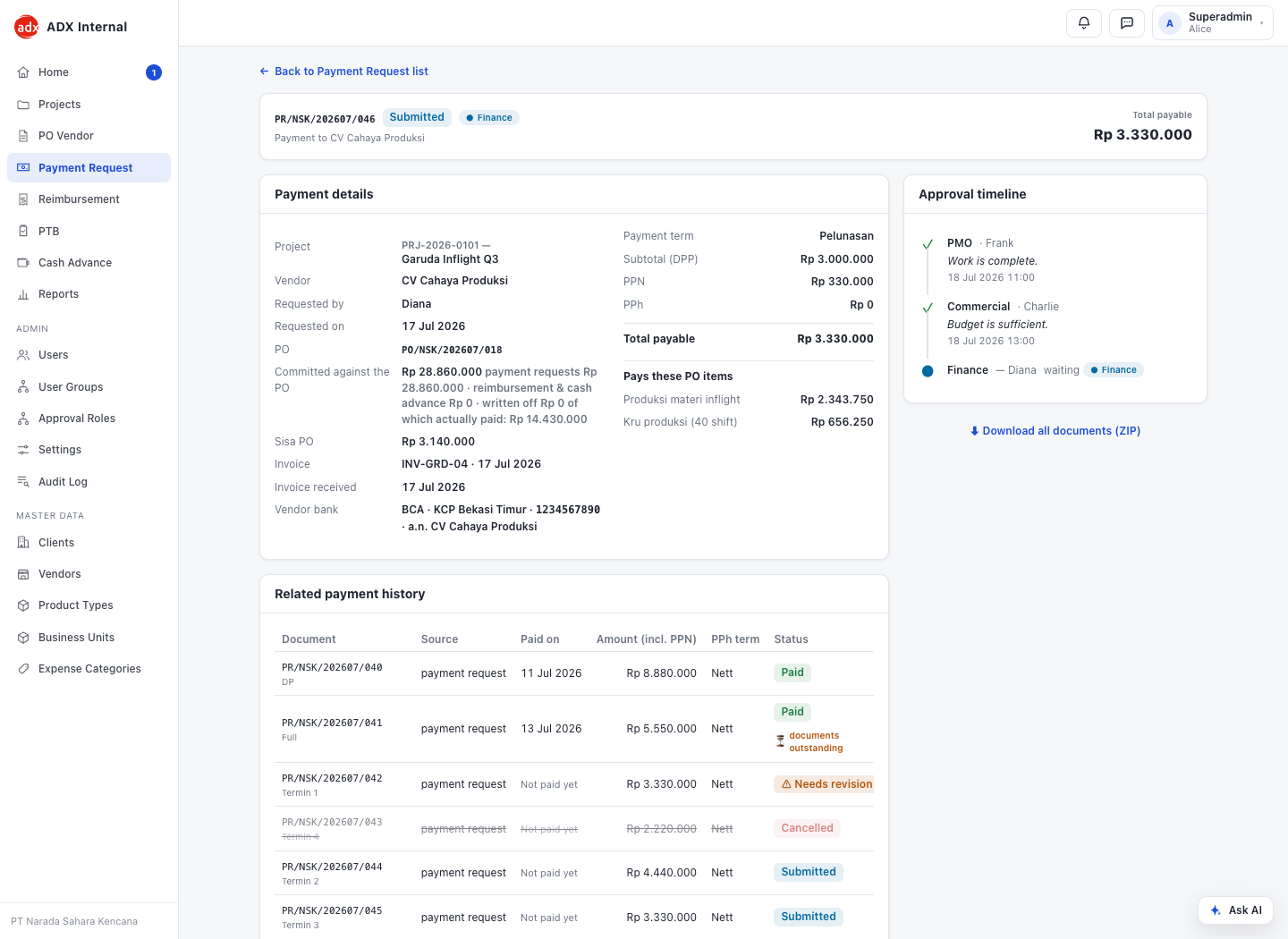
The request, payment history, and current reviewer in one view. Example shown with demo data.
How the workflow works
From request to a completed record.
One request moves through four stages.
People own each stage. The system carries the information, applies the rules, and shows what needs attention.
01 / Prepare
Start with the information already there.
The requester selects a purchase order—the record of what the company agreed to buy. They can see earlier payments and the remaining amount, choose the vendor’s registered bank account, and add the invoice and required documents.
02 / Review
Give the next person what they need.
The system checks required information and payment limits, then routes the request to the right reviewers. Each person can inspect the details and documents. The timeline shows whose turn it is and records the decisions.
03 / Record payment
Keep payment in Finance’s hands.
Finance checks the approvals, bank details, and supporting documents before recording payment and attaching transfer proof. A payment record stays connected to the request that authorised it.
04 / Follow through
Keep unfinished work visible.
If a permitted document is still outstanding, the request stays open for follow-up even after payment. The requester supplies it and Finance confirms completion. Uploading a file alone does not close the process.
Designed to improve everyday work
Less chasing. Clearer work.
The workflow is designed to make requests easier to prepare, review, and follow through.
Faster submission
Start from an existing purchase order and registered vendor details.
Cleaner submissions
Use consistent fields, document checklists, and amount checks.
Faster verification
Put the supporting documents, payment history, and decisions together.
Fewer emails
Keep status, discussions, and follow-up with the request.
Clearer responsibility
Show the active reviewer and the next action in the timeline.
Fewer missed items
Keep pending approvals and outstanding documents visible.
One example. Many kinds of work.
Your workflow will be different.
The same approach can support research, reporting, planning, customer service, and other daily work. We start with your people and your process, then decide where AI can help and where human judgment belongs.